顯示具有 百香果練銀網平台 標籤的文章。 顯示所有文章

2022年7月2日 星期六

系列活動推動大坪頂六級化產業之產地到餐桌-社區風土遊程、餐桌料理開發與餐桌美學

 文:洪崇彬、蔡名桂      圖:USR計畫辦公室、洪崇彬

        本校今年擔任中部地區大學社會責任跨校聯盟召集學校,特地邀請中國醫藥大學、弘光科技大學、東海大學、國立暨南國際大學、國立臺灣體育運動大學、逢甲大學、靜宜大學、國立勤益科技大學,前來本校USR計畫場域進行討論會議暨六星級農村小旅行與美食饗宴。這個饗宴即是前兩個階段活動的延伸-「大坪頂戶外餐桌活動策畫與風土餐桌料理分享」(產地食材之料理開發)、「大坪頂風土餐桌美學與特色佈置實作體驗活動工作坊」(餐桌美學與服務體驗),相互串連起大坪頂產地到餐桌,展現六級化產業之具體成果。

        本活動舉辦地點在辰光能源科技公司,該公司提供專業的食品廠規劃,並設有雲端智慧中央廚房,也是協助本校建置截切示範教學設備的廠商,將最專業的技術導入本校USR計畫中。活動開始帶領聯盟學校成員參觀食品廠之配置與設計,了解食品加工與食品安全之生產流程規劃與設計。

百香果USR計畫主持人林正敏副校長開場致詞


成員參觀辰光能源科技公司專業的食品廠規劃

在活動進行的同時藉由之前的餐飲專業師資團隊與貳月食藝,結合社區夥伴搭配本校餐飲系與休閒系學生一同進行午餐料理,準備將埔里場域特色食材融入料理設計,創作美味佳餚。接著與大美生活提案所合作,作品以「土生土長」為主題,從餐墊的創作與運用,到餐宴的美學設計,菜單設計及餐桌的布置,在在展現埔里大坪頂在地文化與景點特色,巧妙融入餐桌佈置中,完美呈現「從產地到餐桌」的饗宴。

團隊、社區夥伴、本校學生進行午餐料理
社區夥伴共同創作的特色餐墊,具有大地色系及由百香果外皮萃出色彩的字體
餐宴布置的美學設計一隅
風土味✖人文學✖生活感
餐宴美學設計

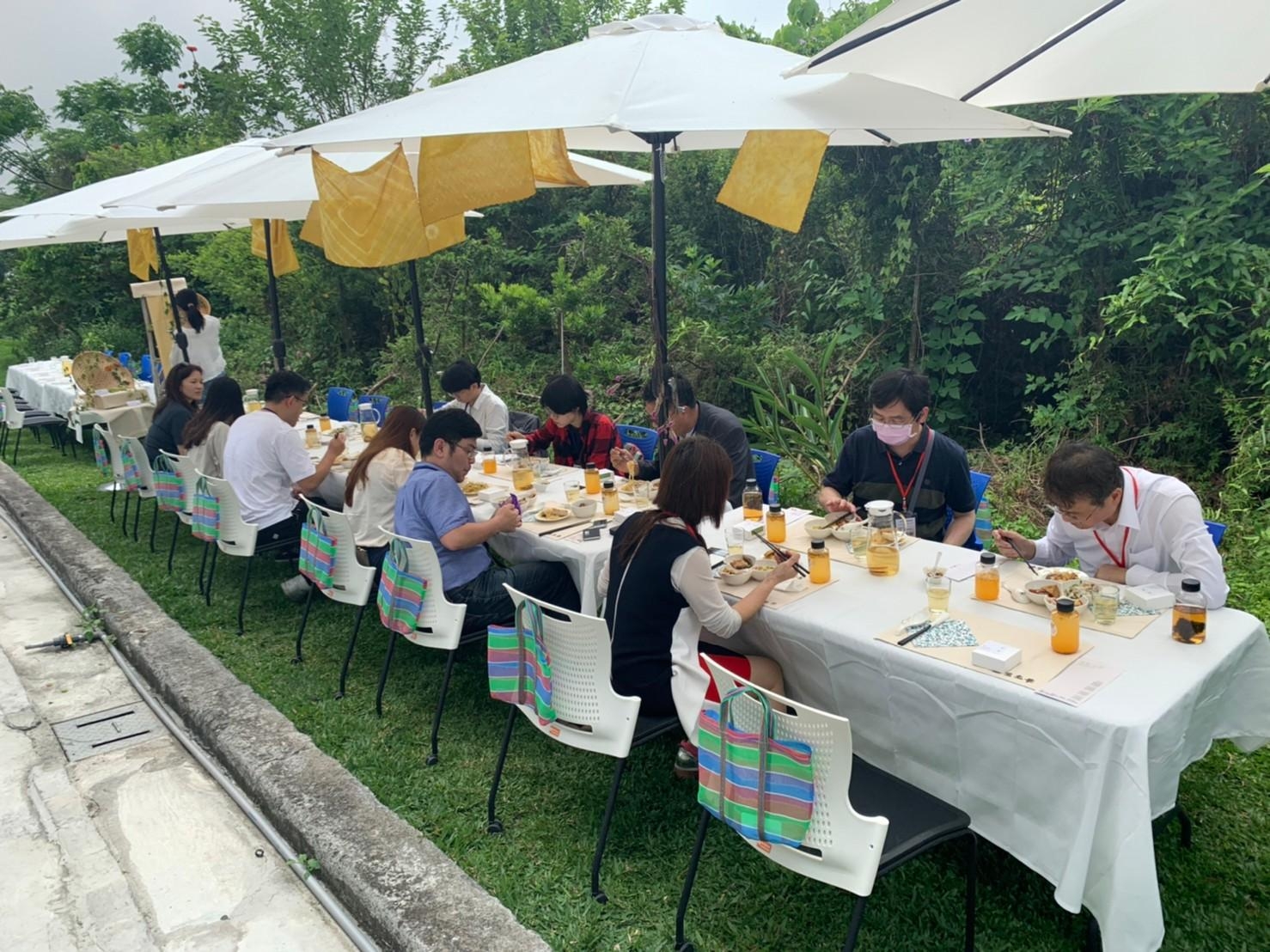
在陽光暖暖、和風徐徐的涼爽氣候中,開始「從產地到餐桌」的美食饗宴,首先廚師團隊、貳月食藝、大美提案所與社區夥伴介紹本次特色餐點與美學設計理念,透過解說更了解埔里大坪頂的百香果如何入菜並搭配其他食材,創作在地美味。而結合風土味✖人文學✖生活感的餐桌,更讓人充分享受與美好用餐環境結合的心靈感受。

特色餐點與美學設計理念介紹

「從產地到餐桌」的美食饗宴

下午的活動由聯盟成員分享各校執行USR計畫的經驗,透過成員精彩深入的分享,讓聯盟夥伴了解並學習各校經驗,作為隊執行USR計畫的參考與借鏡,大家收穫滿滿。

執行USR計畫經驗分享
參與的聯盟夥伴與成員


        本次活動延伸前兩個階段的活動,將產地食材之料理開發的1級✖2級「大坪頂戶外餐桌活動策畫與風土餐桌料理分享」;以及餐桌美學與服務體驗的2級✖3級「大坪頂風土餐桌美學與特色佈置實作體驗活動工作坊」;串連到本次社區風土遊程、餐桌料理開發與餐桌美學的1級✖2級✖3級「中區USR聯盟會議暨南投百香果資源永續之煉銀網平台分享工作坊」,將大坪頂產地特色食材、百香果等,透過「土生土長」主題美學餐宴,確實展現埔里大坪頂在地文化到餐桌之六級化產業之具體成果,完成六星級農村小旅行與美食饗宴,也呈現大坪頂六級化產業成效。

        本活動也讓讓中區USR聯盟充分感受本校USR計畫帶給本校師生與社區夥伴的改變,藉由事前的專業師資與本校師生進入社區教學與共學,藉由共學吸取百香果特色餐桌料理新知,在未來料理開發時能融入在地食材及結合遊程規劃,創造獨一無二屬於大坪頂的特色料理。同時藉由活動舉辦亦可提升並檢討學校USR整體推動,促進本校師生與受輔導社區夥伴共興共榮,並增進本校在南投地區USR影響力。
本校從產地到餐桌一系列活動,推動大坪頂之六級化產業實現

2022年6月25日 星期六

用一張照片述說跨域合作的故事

 一張照片述說南開人與南投共生共榮的故事,4年前南開人以"好還要更好"的理念,執行大學社會責任實踐計畫"南投百香果資源永續之煉銀網平台",委員問到:南開沒有農業系所憑什麼本事有能力執行百香果計畫以及百香果在埔里合成里是全國第一,南開人能做什麼?這四年下來,南開人用熱情和專業留下"一顆小小百香果改變大學教與學"以及推動"全果應用"的共學足跡。照片中用印有南開科技大學的NPF商標裝載著埔里合成里農民採用無農藥栽培技術的辛苦淚水以及要讓消費者安心的堅持成果。

去年南開人組成跨域團隊向科技部申請產學小聯盟計畫,為了實現南投以農業和工藝來發展永續觀光的夢想。這個計畫最困難的是敏哥要向小農、工藝師、企業收取會費,這比寫程式還難,感謝所有加入聯盟會員,由於您們加入,我們正朝著夢想前進。
照片可以清楚看到青蛙王國,青蛙王國是聯盟在桃米的第一個會員,這是很棒共學場域,可以提供會員們共學成長的地方,不但風景美、設施完善,更重要的是有一位青年人在工藝中心練功15年有成,來到青蛙王國用心推廣工藝來佈置場域的感人故事。
預告:7/1有草屯光點小聚在中興新村以及7/5集集廊帶村落印象x 小台北走讀x 數位餐桌 的活動,歡迎大家報名參加,非會員也可以參加喔!


2021年7月21日 星期三

十個步驟輕輕鬆鬆利用Mezzanine打造百香果交易行情網站


利用暑假三週開設"Python/Django程式設計-以百香果USR為例"的微學分,共20小時,參與的學生都可以獲得一個學分,敏哥以過去三年用南投百香果來開發Python教材,期待學習者能瞭解Python/Django的程式設計,也能瞭解到台灣百香果的故鄉在南投埔里鎮的合成里。

因為有些教材已經開發1-2年,在上課中,發現有些動手做的教材,還是無法順利操作,產生許多的問題,其中有一個應該是農委會的資料提供問題,透過討論以及上網搜尋資料,我們發表"此蟲非蟲"的文章。另外有些是因為Python/Django版本的問題,今天就來說明如何運用"十個步驟輕輕鬆鬆利用Mezzanine打造百香果交易網站",因為Django版本更新,造成Mezzanine跟不上,還好經過上網有找到解決方法。

十個步驟輕輕鬆鬆利用Mezzanine打造百香果交易行情網站,其步驟如下:

1. 建立虛擬環境npf,安裝Mezzanine套件。
1.1 建立虛擬環境
mkvirtualenv npf


1.2.安裝Mezzanine套件
pip install mezzanine


2.建立Mezzanine專案
mezzanine-project npf
cd npf


3.建立資料庫
3.1 執行建立資料庫的指令

python manage.py migrate --run-syncdb


3.2 建立使用者帳號

python manage.py createsuperuser


初學者先建議用下列值:

Username:demo
Email:test@gmail.com
Password:1234
Password(again):1234

4.啟動網站

4.1,輸入啟動網站的指令
python manage.py runserver

4.2打開瀏覽器,輸入127.0.0.1:8000
4.3進入後台,輸入127.0.0.1:8000/admin

輸入帳號和密碼,按下Log in鍵


5.下載下列網址的主題,解壓縮後,複製flat, moderna, mova, solid等目錄。
https://github.com/thecodinghouse/mezzanine-themes

把它放在mezzanine-template目錄下,並解開查看。


6.複製主題目錄:把上圖flat, moderna, mova, solid等四個目錄,複製到npf的目錄下,如下圖。

7.修改settings.py檔案,並重新整理畫面
7-1 在INSTALLED_APPS加入"moderna"的APP,在第244行黃底黑色字。

  1
  2
  3
  4
  5
  6
  7
  8
  9
 10
 11
 12
 13
 14
 15
 16
 17
 18
 19
 20
 21
 22
 23
 24
 25
 26
 27
 28
 29
 30
 31
 32
 33
 34
 35
 36
 37
 38
 39
 40
 41
 42
 43
 44
 45
 46
 47
 48
 49
 50
 51
 52
 53
 54
 55
 56
 57
 58
 59
 60
 61
 62
 63
 64
 65
 66
 67
 68
 69
 70
 71
 72
 73
 74
 75
 76
 77
 78
 79
 80
 81
 82
 83
 84
 85
 86
 87
 88
 89
 90
 91
 92
 93
 94
 95
 96
 97
 98
 99
100
101
102
103
104
105
106
107
108
109
110
111
112
113
114
115
116
117
118
119
120
121
122
123
124
125
126
127
128
129
130
131
132
133
134
135
136
137
138
139
140
141
142
143
144
145
146
147
148
149
150
151
152
153
154
155
156
157
158
159
160
161
162
163
164
165
166
167
168
169
170
171
172
173
174
175
176
177
178
179
180
181
182
183
184
185
186
187
188
189
190
191
192
193
194
195
196
197
198
199
200
201
202
203
204
205
206
207
208
209
210
211
212
213
214
215
216
217
218
219
220
221
222
223
224
225
226
227
228
229
230
231
232
233
234
235
236
237
238
239
240
241
242
243
244
245
246
247
248
249
250
251
252
253
254
255
256
257
258
259
260
261
262
263
264
265
266
267
268
269
270
271
272
273
274
275
276
277
278
279
280
281
282
283
284
285
286
287
288
289
290
291
292
293
294
295
296
297
298
299
300
301
302
303
304
305
306
307
308
309
310
311
312
313
314
315
316
317
318
319
320
321
322
323
324
325
326
327
328
329
330
331
332
333
334
335
336
337
338
339
340
341
342
from __future__ import absolute_import, unicode_literals
import os

from django import VERSION as DJANGO_VERSION
from django.utils.translation import ugettext_lazy as _


######################
# MEZZANINE SETTINGS #
######################

# The following settings are already defined with default values in
# the ``defaults.py`` module within each of Mezzanine's apps, but are
# common enough to be put here, commented out, for conveniently
# overriding. Please consult the settings documentation for a full list
# of settings Mezzanine implements:
# http://mezzanine.jupo.org/docs/configuration.html#default-settings

# Controls the ordering and grouping of the admin menu.
#
# ADMIN_MENU_ORDER = (
#     ("Content", ("pages.Page", "blog.BlogPost",
#        "generic.ThreadedComment", (_("Media Library"), "media-library"),)),
#     ("Site", ("sites.Site", "redirects.Redirect", "conf.Setting")),
#     ("Users", ("auth.User", "auth.Group",)),
# )

# A three item sequence, each containing a sequence of template tags
# used to render the admin dashboard.
#
# DASHBOARD_TAGS = (
#     ("blog_tags.quick_blog", "mezzanine_tags.app_list"),
#     ("comment_tags.recent_comments",),
#     ("mezzanine_tags.recent_actions",),
# )

# A sequence of templates used by the ``page_menu`` template tag. Each
# item in the sequence is a three item sequence, containing a unique ID
# for the template, a label for the template, and the template path.
# These templates are then available for selection when editing which
# menus a page should appear in. Note that if a menu template is used
# that doesn't appear in this setting, all pages will appear in it.

# PAGE_MENU_TEMPLATES = (
#     (1, _("Top navigation bar"), "pages/menus/dropdown.html"),
#     (2, _("Left-hand tree"), "pages/menus/tree.html"),
#     (3, _("Footer"), "pages/menus/footer.html"),
# )

# A sequence of fields that will be injected into Mezzanine's (or any
# library's) models. Each item in the sequence is a four item sequence.
# The first two items are the dotted path to the model and its field
# name to be added, and the dotted path to the field class to use for
# the field. The third and fourth items are a sequence of positional
# args and a dictionary of keyword args, to use when creating the
# field instance. When specifying the field class, the path
# ``django.models.db.`` can be omitted for regular Django model fields.
#
# EXTRA_MODEL_FIELDS = (
#     (
#         # Dotted path to field.
#         "mezzanine.blog.models.BlogPost.image",
#         # Dotted path to field class.
#         "somelib.fields.ImageField",
#         # Positional args for field class.
#         (_("Image"),),
#         # Keyword args for field class.
#         {"blank": True, "upload_to": "blog"},
#     ),
#     # Example of adding a field to *all* of Mezzanine's content types:
#     (
#         "mezzanine.pages.models.Page.another_field",
#         "IntegerField", # 'django.db.models.' is implied if path is omitted.
#         (_("Another name"),),
#         {"blank": True, "default": 1},
#     ),
# )

# Setting to turn on featured images for blog posts. Defaults to False.
#
# BLOG_USE_FEATURED_IMAGE = True

# If True, the django-modeltranslation will be added to the
# INSTALLED_APPS setting.
USE_MODELTRANSLATION = False


########################
# MAIN DJANGO SETTINGS #
########################

# Hosts/domain names that are valid for this site; required if DEBUG is False
# See https://docs.djangoproject.com/en/dev/ref/settings/#allowed-hosts
ALLOWED_HOSTS = []

# Local time zone for this installation. Choices can be found here:
# http://en.wikipedia.org/wiki/List_of_tz_zones_by_name
# although not all choices may be available on all operating systems.
# On Unix systems, a value of None will cause Django to use the same
# timezone as the operating system.
# If running in a Windows environment this must be set to the same as your
# system time zone.
TIME_ZONE = 'UTC'

# If you set this to True, Django will use timezone-aware datetimes.
USE_TZ = True

# Language code for this installation. All choices can be found here:
# http://www.i18nguy.com/unicode/language-identifiers.html
LANGUAGE_CODE = "en"

# Supported languages
LANGUAGES = (
    ('en', _('English')),
)

# A boolean that turns on/off debug mode. When set to ``True``, stack traces
# are displayed for error pages. Should always be set to ``False`` in
# production. Best set to ``True`` in local_settings.py
DEBUG = False

# Whether a user's session cookie expires when the Web browser is closed.
SESSION_EXPIRE_AT_BROWSER_CLOSE = True

SITE_ID = 1

# If you set this to False, Django will make some optimizations so as not
# to load the internationalization machinery.
USE_I18N = False

AUTHENTICATION_BACKENDS = ("mezzanine.core.auth_backends.MezzanineBackend",)

# The numeric mode to set newly-uploaded files to. The value should be
# a mode you'd pass directly to os.chmod.
FILE_UPLOAD_PERMISSIONS = 0o644


#############
# DATABASES #
#############

DATABASES = {
    "default": {
        # Add "postgresql_psycopg2", "mysql", "sqlite3" or "oracle".
        "ENGINE": "django.db.backends.",
        # DB name or path to database file if using sqlite3.
        "NAME": "",
        # Not used with sqlite3.
        "USER": "",
        # Not used with sqlite3.
        "PASSWORD": "",
        # Set to empty string for localhost. Not used with sqlite3.
        "HOST": "",
        # Set to empty string for default. Not used with sqlite3.
        "PORT": "",
    }
}


#########
# PATHS #
#########

# Full filesystem path to the project.
PROJECT_APP_PATH = os.path.dirname(os.path.abspath(__file__))
PROJECT_APP = os.path.basename(PROJECT_APP_PATH)
PROJECT_ROOT = BASE_DIR = os.path.dirname(PROJECT_APP_PATH)

# Every cache key will get prefixed with this value - here we set it to
# the name of the directory the project is in to try and use something
# project specific.
CACHE_MIDDLEWARE_KEY_PREFIX = PROJECT_APP

# URL prefix for static files.
# Example: "http://media.lawrence.com/static/"
STATIC_URL = "/static/"

# Absolute path to the directory static files should be collected to.
# Don't put anything in this directory yourself; store your static files
# in apps' "static/" subdirectories and in STATICFILES_DIRS.
# Example: "/home/media/media.lawrence.com/static/"
STATIC_ROOT = os.path.join(PROJECT_ROOT, STATIC_URL.strip("/"))

# URL that handles the media served from MEDIA_ROOT. Make sure to use a
# trailing slash.
# Examples: "http://media.lawrence.com/media/", "http://example.com/media/"
MEDIA_URL = STATIC_URL + "media/"

# Absolute filesystem path to the directory that will hold user-uploaded files.
# Example: "/home/media/media.lawrence.com/media/"
MEDIA_ROOT = os.path.join(PROJECT_ROOT, *MEDIA_URL.strip("/").split("/"))

# Package/module name to import the root urlpatterns from for the project.
ROOT_URLCONF = "%s.urls" % PROJECT_APP

TEMPLATES = [
    {
        "BACKEND": "django.template.backends.django.DjangoTemplates",
        "DIRS": [
            os.path.join(PROJECT_ROOT, "templates")
        ],
        "OPTIONS": {
            "context_processors": [
                "django.contrib.auth.context_processors.auth",
                "django.contrib.messages.context_processors.messages",
                "django.template.context_processors.debug",
                "django.template.context_processors.i18n",
                "django.template.context_processors.static",
                "django.template.context_processors.media",
                "django.template.context_processors.request",
                "django.template.context_processors.tz",
                "mezzanine.conf.context_processors.settings",
                "mezzanine.pages.context_processors.page",
            ],
            "builtins": [
                "mezzanine.template.loader_tags",
            ],
            "loaders": [
                "mezzanine.template.loaders.host_themes.Loader",
                "django.template.loaders.filesystem.Loader",
                "django.template.loaders.app_directories.Loader",
            ]
        },
    },
]

if DJANGO_VERSION < (1, 9):
    del TEMPLATES[0]["OPTIONS"]["builtins"]


################
# APPLICATIONS #
################

INSTALLED_APPS = (
    "django.contrib.admin",
    "django.contrib.auth",
    "django.contrib.contenttypes",
    "django.contrib.redirects",
    "django.contrib.sessions",
    "django.contrib.sites",
    "django.contrib.sitemaps",
    "django.contrib.staticfiles",
    "moderna",
    "mezzanine.boot",
    "mezzanine.conf",
    "mezzanine.core",
    "mezzanine.generic",
    "mezzanine.pages",
    "mezzanine.blog",
    "mezzanine.forms",
    "mezzanine.galleries",
    "mezzanine.twitter",
    # "mezzanine.accounts",
)

# List of middleware classes to use. Order is important; in the request phase,
# these middleware classes will be applied in the order given, and in the
# response phase the middleware will be applied in reverse order.
MIDDLEWARE = (
    "mezzanine.core.middleware.UpdateCacheMiddleware",

    'django.contrib.sessions.middleware.SessionMiddleware',
    # Uncomment if using internationalisation or localisation
    # 'django.middleware.locale.LocaleMiddleware',
    'django.middleware.common.CommonMiddleware',
    'django.middleware.csrf.CsrfViewMiddleware',
    'django.contrib.auth.middleware.AuthenticationMiddleware',
    'django.contrib.auth.middleware.SessionAuthenticationMiddleware',
    'django.contrib.messages.middleware.MessageMiddleware',
    'django.middleware.clickjacking.XFrameOptionsMiddleware',

    "mezzanine.core.request.CurrentRequestMiddleware",
    "mezzanine.core.middleware.RedirectFallbackMiddleware",
    "mezzanine.core.middleware.AdminLoginInterfaceSelectorMiddleware",
    "mezzanine.core.middleware.SitePermissionMiddleware",
    "mezzanine.pages.middleware.PageMiddleware",
    "mezzanine.core.middleware.FetchFromCacheMiddleware",
)

if DJANGO_VERSION < (1, 10):
    MIDDLEWARE_CLASSES = MIDDLEWARE
    del MIDDLEWARE


# Store these package names here as they may change in the future since
# at the moment we are using custom forks of them.
PACKAGE_NAME_FILEBROWSER = "filebrowser_safe"
PACKAGE_NAME_GRAPPELLI = "grappelli_safe"

#########################
# OPTIONAL APPLICATIONS #
#########################

# These will be added to ``INSTALLED_APPS``, only if available.
OPTIONAL_APPS = (
    "debug_toolbar",
    "django_extensions",
    "compressor",
    PACKAGE_NAME_FILEBROWSER,
    PACKAGE_NAME_GRAPPELLI,
)

##################
# LOCAL SETTINGS #
##################

# Allow any settings to be defined in local_settings.py which should be
# ignored in your version control system allowing for settings to be
# defined per machine.

# Instead of doing "from .local_settings import *", we use exec so that
# local_settings has full access to everything defined in this module.
# Also force into sys.modules so it's visible to Django's autoreload.

f = os.path.join(PROJECT_APP_PATH, "local_settings.py")
if os.path.exists(f):
    import sys
    import imp
    module_name = "%s.local_settings" % PROJECT_APP
    module = imp.new_module(module_name)
    module.__file__ = f
    sys.modules[module_name] = module
    exec(open(f, "rb").read())


####################
# DYNAMIC SETTINGS #
####################

# set_dynamic_settings() will rewrite globals based on what has been
# defined so far, in order to provide some better defaults where
# applicable. We also allow this settings module to be imported
# without Mezzanine installed, as the case may be when using the
# fabfile, where setting the dynamic settings below isn't strictly
# required.
try:
    from mezzanine.utils.conf import set_dynamic_settings
except ImportError:
    pass
else:
    set_dynamic_settings(globals())

7-2 從新整理畫面

8. 讓Mezzanine承接自己的意圖
8-1 打開urls.py程式 ,瞭解視圖(views)程式是來自mezzanine.core.views中的direct_to_template函式。

  1
  2
  3
  4
  5
  6
  7
  8
  9
 10
 11
 12
 13
 14
 15
 16
 17
 18
 19
 20
 21
 22
 23
 24
 25
 26
 27
 28
 29
 30
 31
 32
 33
 34
 35
 36
 37
 38
 39
 40
 41
 42
 43
 44
 45
 46
 47
 48
 49
 50
 51
 52
 53
 54
 55
 56
 57
 58
 59
 60
 61
 62
 63
 64
 65
 66
 67
 68
 69
 70
 71
 72
 73
 74
 75
 76
 77
 78
 79
 80
 81
 82
 83
 84
 85
 86
 87
 88
 89
 90
 91
 92
 93
 94
 95
 96
 97
 98
 99
100
101
102
103
104
105
from __future__ import unicode_literals

from django.conf.urls import include, url
from django.conf.urls.i18n import i18n_patterns
from django.contrib import admin
from django.views.i18n import set_language

from mezzanine.core.views import direct_to_template
from mezzanine.conf import settings

# Uncomment to use blog as home page. See also urlpatterns section below.
# from mezzanine.blog import views as blog_views

admin.autodiscover()

# Add the urlpatterns for any custom Django applications here.
# You can also change the ``home`` view to add your own functionality
# to the project's homepage.

urlpatterns = i18n_patterns(
    # Change the admin prefix here to use an alternate URL for the
    # admin interface, which would be marginally more secure.
    url("^admin/", include(admin.site.urls)),
)

if settings.USE_MODELTRANSLATION:
    urlpatterns += [
        url('^i18n/$', set_language, name='set_language'),
    ]

urlpatterns += [
    # We don't want to presume how your homepage works, so here are a
    # few patterns you can use to set it up.

    # HOMEPAGE AS STATIC TEMPLATE
    # ---------------------------
    # This pattern simply loads the index.html template. It isn't
    # commented out like the others, so it's the default. You only need
    # one homepage pattern, so if you use a different one, comment this
    # one out.

    url("^$", direct_to_template, {"template": "index.html"}, name="home"),

    # HOMEPAGE AS AN EDITABLE PAGE IN THE PAGE TREE
    # ---------------------------------------------
    # This pattern gives us a normal ``Page`` object, so that your
    # homepage can be managed via the page tree in the admin. If you
    # use this pattern, you'll need to create a page in the page tree,
    # and specify its URL (in the Meta Data section) as "/", which
    # is the value used below in the ``{"slug": "/"}`` part.
    # Also note that the normal rule of adding a custom
    # template per page with the template name using the page's slug
    # doesn't apply here, since we can't have a template called
    # "/.html" - so for this case, the template "pages/index.html"
    # should be used if you want to customize the homepage's template.
    # NOTE: Don't forget to import the view function too!

    # url("^$", mezzanine.pages.views.page, {"slug": "/"}, name="home"),

    # HOMEPAGE FOR A BLOG-ONLY SITE
    # -----------------------------
    # This pattern points the homepage to the blog post listing page,
    # and is useful for sites that are primarily blogs. If you use this
    # pattern, you'll also need to set BLOG_SLUG = "" in your
    # ``settings.py`` module, and delete the blog page object from the
    # page tree in the admin if it was installed.
    # NOTE: Don't forget to import the view function too!

    # url("^$", blog_views.blog_post_list, name="home"),

    # MEZZANINE'S URLS
    # ----------------
    # ADD YOUR OWN URLPATTERNS *ABOVE* THE LINE BELOW.
    # ``mezzanine.urls`` INCLUDES A *CATCH ALL* PATTERN
    # FOR PAGES, SO URLPATTERNS ADDED BELOW ``mezzanine.urls``
    # WILL NEVER BE MATCHED!

    # If you'd like more granular control over the patterns in
    # ``mezzanine.urls``, go right ahead and take the parts you want
    # from it, and use them directly below instead of using
    # ``mezzanine.urls``.
    url("^", include("mezzanine.urls")),

    # MOUNTING MEZZANINE UNDER A PREFIX
    # ---------------------------------
    # You can also mount all of Mezzanine's urlpatterns under a
    # URL prefix if desired. When doing this, you need to define the
    # ``SITE_PREFIX`` setting, which will contain the prefix. Eg:
    # SITE_PREFIX = "my/site/prefix"
    # For convenience, and to avoid repeating the prefix, use the
    # commented out pattern below (commenting out the one above of course)
    # which will make use of the ``SITE_PREFIX`` setting. Make sure to
    # add the import ``from django.conf import settings`` to the top
    # of this file as well.
    # Note that for any of the various homepage patterns above, you'll
    # need to use the ``SITE_PREFIX`` setting as well.

    # ("^%s/" % settings.SITE_PREFIX, include("mezzanine.urls"))

]

# Adds ``STATIC_URL`` to the context of error pages, so that error
# pages can use JS, CSS and images.
handler404 = "mezzanine.core.views.page_not_found"
handler500 = "mezzanine.core.views.server_error"

8-2 找出mezzanine.core.views中的direct_to_template函式的位置,我們建置npf虛擬環境,因此我們可以在Envs\npf\Lib\site-packages\mezzanine\core目錄下,發現views.py。打開mezzanine.core.views.pypy在第67-77行,就可以看到direct_to_template函式。

  1
  2
  3
  4
  5
  6
  7
  8
  9
 10
 11
 12
 13
 14
 15
 16
 17
 18
 19
 20
 21
 22
 23
 24
 25
 26
 27
 28
 29
 30
 31
 32
 33
 34
 35
 36
 37
 38
 39
 40
 41
 42
 43
 44
 45
 46
 47
 48
 49
 50
 51
 52
 53
 54
 55
 56
 57
 58
 59
 60
 61
 62
 63
 64
 65
 66
 67
 68
 69
 70
 71
 72
 73
 74
 75
 76
 77
 78
 79
 80
 81
 82
 83
 84
 85
 86
 87
 88
 89
 90
 91
 92
 93
 94
 95
 96
 97
 98
 99
100
101
102
103
104
105
106
107
108
109
110
111
112
113
114
115
116
117
118
119
120
121
122
123
124
125
126
127
128
129
130
131
132
133
134
135
136
137
138
139
140
141
142
143
144
145
146
147
148
149
150
151
152
153
154
155
156
157
158
159
160
161
162
163
164
165
166
167
168
169
170
171
172
173
174
175
176
177
178
179
180
181
182
183
184
185
186
187
188
189
190
191
192
193
194
195
196
197
198
199
200
201
202
203
204
205
206
207
208
209
210
211
212
213
214
215
216
217
218
219
220
from __future__ import absolute_import, unicode_literals
from future.builtins import int, open, str

import os
import mimetypes

from json import dumps

from django.template.response import TemplateResponse

try:
    from urllib.parse import urljoin, urlparse
except ImportError:
    from urlparse import urljoin, urlparse

from django.apps import apps
from django.contrib import admin
from django.contrib.admin.views.decorators import staff_member_required
from django.contrib.admin.options import ModelAdmin
from django.contrib.staticfiles import finders
from django.core.exceptions import PermissionDenied
from django.core.urlresolvers import reverse
from django.http import (HttpResponse, HttpResponseServerError,
                         HttpResponseNotFound)
from django.shortcuts import redirect
from django.template.loader import get_template
from django.utils.translation import ugettext_lazy as _
from django.views.decorators.csrf import requires_csrf_token

from mezzanine.conf import settings
from mezzanine.core.forms import get_edit_form
from mezzanine.core.models import Displayable, SitePermission
from mezzanine.utils.views import is_editable, paginate
from mezzanine.utils.sites import has_site_permission
from mezzanine.utils.urls import next_url


mimetypes.init()


@staff_member_required
def set_site(request):
    """
    Put the selected site ID into the session - posted to from
    the "Select site" drop-down in the header of the admin. The
    site ID is then used in favour of the current request's
    domain in ``mezzanine.core.managers.CurrentSiteManager``.
    """
    site_id = int(request.GET["site_id"])
    if not request.user.is_superuser:
        try:
            SitePermission.objects.get(user=request.user, sites=site_id)
        except SitePermission.DoesNotExist:
            raise PermissionDenied
    request.session["site_id"] = site_id
    admin_url = reverse("admin:index")
    next = next_url(request) or admin_url
    # Don't redirect to a change view for an object that won't exist
    # on the selected site - go to its list view instead.
    if next.startswith(admin_url):
        parts = next.split("/")
        if len(parts) > 4 and parts[4].isdigit():
            next = "/".join(parts[:4])
    return redirect(next)


def direct_to_template(request, template, extra_context=None, **kwargs):
    """
    Replacement for Django's ``direct_to_template`` that uses
    ``TemplateResponse`` via ``mezzanine.utils.views.render``.
    """
    context = extra_context or {}
    context["params"] = kwargs
    for (key, value) in context.items():
        if callable(value):
            context[key] = value()
    return TemplateResponse(request, template, context)


@staff_member_required
def edit(request):
    """
    Process the inline editing form.
    """
    model = apps.get_model(request.POST["app"], request.POST["model"])
    obj = model.objects.get(id=request.POST["id"])
    form = get_edit_form(obj, request.POST["fields"], data=request.POST,
                         files=request.FILES)
    if not (is_editable(obj, request) and has_site_permission(request.user)):
        response = _("Permission denied")
    elif form.is_valid():
        form.save()
        model_admin = ModelAdmin(model, admin.site)
        message = model_admin.construct_change_message(request, form, None)
        model_admin.log_change(request, obj, message)
        response = ""
    else:
        response = list(form.errors.values())[0][0]
    return HttpResponse(response)


def search(request, template="search_results.html", extra_context=None):
    """
    Display search results. Takes an optional "contenttype" GET parameter
    in the form "app-name.ModelName" to limit search results to a single model.
    """
    query = request.GET.get("q", "")
    page = request.GET.get("page", 1)
    per_page = settings.SEARCH_PER_PAGE
    max_paging_links = settings.MAX_PAGING_LINKS
    try:
        parts = request.GET.get("type", "").split(".", 1)
        search_model = apps.get_model(*parts)
        search_model.objects.search  # Attribute check
    except (ValueError, TypeError, LookupError, AttributeError):
        search_model = Displayable
        search_type = _("Everything")
    else:
        search_type = search_model._meta.verbose_name_plural.capitalize()
    results = search_model.objects.search(query, for_user=request.user)
    paginated = paginate(results, page, per_page, max_paging_links)
    context = {"query": query, "results": paginated,
               "search_type": search_type}
    context.update(extra_context or {})
    return TemplateResponse(request, template, context)


@staff_member_required
def static_proxy(request):
    """
    Serves TinyMCE plugins inside the inline popups and the uploadify
    SWF, as these are normally static files, and will break with
    cross-domain JavaScript errors if ``STATIC_URL`` is an external
    host. URL for the file is passed in via querystring in the inline
    popup plugin template, and we then attempt to pull out the relative
    path to the file, so that we can serve it locally via Django.
    """
    normalize = lambda u: ("//" + u.split("://")[-1]) if "://" in u else u
    url = normalize(request.GET["u"])
    host = "//" + request.get_host()
    static_url = normalize(settings.STATIC_URL)
    for prefix in (host, static_url, "/"):
        if url.startswith(prefix):
            url = url.replace(prefix, "", 1)
    response = ""
    (content_type, encoding) = mimetypes.guess_type(url)
    if content_type is None:
        content_type = "application/octet-stream"
    path = finders.find(url)
    if path:
        if isinstance(path, (list, tuple)):
            path = path[0]
        if url.endswith(".htm"):
            # Inject <base href="{{ STATIC_URL }}"> into TinyMCE
            # plugins, since the path static files in these won't be
            # on the same domain.
            static_url = settings.STATIC_URL + os.path.split(url)[0] + "/"
            if not urlparse(static_url).scheme:
                static_url = urljoin(host, static_url)
            base_tag = "<base href='%s'>" % static_url
            with open(path, "r") as f:
                response = f.read().replace("<head>", "<head>" + base_tag)
        else:
            try:
                with open(path, "rb") as f:
                    response = f.read()
            except IOError:
                return HttpResponseNotFound()
    return HttpResponse(response, content_type=content_type)


def displayable_links_js(request):
    """
    Renders a list of url/title pairs for all ``Displayable`` subclass
    instances into JSON that's used to populate a list of links in
    TinyMCE.
    """
    links = []
    if "mezzanine.pages" in settings.INSTALLED_APPS:
        from mezzanine.pages.models import Page
        is_page = lambda obj: isinstance(obj, Page)
    else:
        is_page = lambda obj: False
    # For each item's title, we use its model's verbose_name, but in the
    # case of Page subclasses, we just use "Page", and then sort the items
    # by whether they're a Page subclass or not, then by their URL.
    for url, obj in Displayable.objects.url_map(for_user=request.user).items():
        title = getattr(obj, "titles", obj.title)
        real = hasattr(obj, "id")
        page = is_page(obj)
        if real:
            verbose_name = _("Page") if page else obj._meta.verbose_name
            title = "%s: %s" % (verbose_name, title)
        links.append((not page and real, {"title": str(title), "value": url}))
    sorted_links = sorted(links, key=lambda link: (link[0], link[1]['value']))
    return HttpResponse(dumps([link[1] for link in sorted_links]))


@requires_csrf_token
def page_not_found(request, *args, **kwargs):
    """
    Mimics Django's 404 handler but with a different template path.
    """
    context = {
        "STATIC_URL": settings.STATIC_URL,
        "request_path": request.path,
    }
    t = get_template(kwargs.get("template_name", "errors/404.html"))
    return HttpResponseNotFound(t.render(context, request))


@requires_csrf_token
def server_error(request, template_name="errors/500.html"):
    """
    Mimics Django's error handler but adds ``STATIC_URL`` to the
    context.
    """
    context = {"STATIC_URL": settings.STATIC_URL}
    t = get_template(template_name)
    return HttpResponseServerError(t.render(context, request))

8-3 找出npf/moderna/views.py,只有一行指令。把步驟8-2的程式第9行和67-77行,複製到步驟8-3的程式
 1
 2
 3
 4
 5
 6
 7
 8
 9
10
11
12
13
14
15
16
from django.shortcuts import render
from django.template.response import TemplateResponse

# Create your views here.

def direct_to_template(request, template, extra_context=None, **kwargs):
    """
    Replacement for Django's ``direct_to_template`` that uses
    ``TemplateResponse`` via ``mezzanine.utils.views.render``.
    """
    context = extra_context or {}
    context["params"] = kwargs
    for (key, value) in context.items():
        if callable(value):
            context[key] = value()
    return TemplateResponse(request, template, context)

8-4 修改urls.py程式,導引到自己的視圖程式的函式。

  1
  2
  3
  4
  5
  6
  7
  8
  9
 10
 11
 12
 13
 14
 15
 16
 17
 18
 19
 20
 21
 22
 23
 24
 25
 26
 27
 28
 29
 30
 31
 32
 33
 34
 35
 36
 37
 38
 39
 40
 41
 42
 43
 44
 45
 46
 47
 48
 49
 50
 51
 52
 53
 54
 55
 56
 57
 58
 59
 60
 61
 62
 63
 64
 65
 66
 67
 68
 69
 70
 71
 72
 73
 74
 75
 76
 77
 78
 79
 80
 81
 82
 83
 84
 85
 86
 87
 88
 89
 90
 91
 92
 93
 94
 95
 96
 97
 98
 99
100
101
102
103
104
105
from __future__ import unicode_literals

from django.conf.urls import include, url
from django.conf.urls.i18n import i18n_patterns
from django.contrib import admin
from django.views.i18n import set_language

from moderna.views import direct_to_template
from mezzanine.conf import settings

# Uncomment to use blog as home page. See also urlpatterns section below.
# from mezzanine.blog import views as blog_views

admin.autodiscover()

# Add the urlpatterns for any custom Django applications here.
# You can also change the ``home`` view to add your own functionality
# to the project's homepage.

urlpatterns = i18n_patterns(
    # Change the admin prefix here to use an alternate URL for the
    # admin interface, which would be marginally more secure.
    url("^admin/", include(admin.site.urls)),
)

if settings.USE_MODELTRANSLATION:
    urlpatterns += [
        url('^i18n/$', set_language, name='set_language'),
    ]

urlpatterns += [
    # We don't want to presume how your homepage works, so here are a
    # few patterns you can use to set it up.

    # HOMEPAGE AS STATIC TEMPLATE
    # ---------------------------
    # This pattern simply loads the index.html template. It isn't
    # commented out like the others, so it's the default. You only need
    # one homepage pattern, so if you use a different one, comment this
    # one out.

    url("^$", direct_to_template, {"template": "index.html"}, name="home"),

    # HOMEPAGE AS AN EDITABLE PAGE IN THE PAGE TREE
    # ---------------------------------------------
    # This pattern gives us a normal ``Page`` object, so that your
    # homepage can be managed via the page tree in the admin. If you
    # use this pattern, you'll need to create a page in the page tree,
    # and specify its URL (in the Meta Data section) as "/", which
    # is the value used below in the ``{"slug": "/"}`` part.
    # Also note that the normal rule of adding a custom
    # template per page with the template name using the page's slug
    # doesn't apply here, since we can't have a template called
    # "/.html" - so for this case, the template "pages/index.html"
    # should be used if you want to customize the homepage's template.
    # NOTE: Don't forget to import the view function too!

    # url("^$", mezzanine.pages.views.page, {"slug": "/"}, name="home"),

    # HOMEPAGE FOR A BLOG-ONLY SITE
    # -----------------------------
    # This pattern points the homepage to the blog post listing page,
    # and is useful for sites that are primarily blogs. If you use this
    # pattern, you'll also need to set BLOG_SLUG = "" in your
    # ``settings.py`` module, and delete the blog page object from the
    # page tree in the admin if it was installed.
    # NOTE: Don't forget to import the view function too!

    # url("^$", blog_views.blog_post_list, name="home"),

    # MEZZANINE'S URLS
    # ----------------
    # ADD YOUR OWN URLPATTERNS *ABOVE* THE LINE BELOW.
    # ``mezzanine.urls`` INCLUDES A *CATCH ALL* PATTERN
    # FOR PAGES, SO URLPATTERNS ADDED BELOW ``mezzanine.urls``
    # WILL NEVER BE MATCHED!

    # If you'd like more granular control over the patterns in
    # ``mezzanine.urls``, go right ahead and take the parts you want
    # from it, and use them directly below instead of using
    # ``mezzanine.urls``.
    url("^", include("mezzanine.urls")),

    # MOUNTING MEZZANINE UNDER A PREFIX
    # ---------------------------------
    # You can also mount all of Mezzanine's urlpatterns under a
    # URL prefix if desired. When doing this, you need to define the
    # ``SITE_PREFIX`` setting, which will contain the prefix. Eg:
    # SITE_PREFIX = "my/site/prefix"
    # For convenience, and to avoid repeating the prefix, use the
    # commented out pattern below (commenting out the one above of course)
    # which will make use of the ``SITE_PREFIX`` setting. Make sure to
    # add the import ``from django.conf import settings`` to the top
    # of this file as well.
    # Note that for any of the various homepage patterns above, you'll
    # need to use the ``SITE_PREFIX`` setting as well.

    # ("^%s/" % settings.SITE_PREFIX, include("mezzanine.urls"))

]

# Adds ``STATIC_URL`` to the context of error pages, so that error
# pages can use JS, CSS and images.
handler404 = "mezzanine.core.views.page_not_found"
handler500 = "mezzanine.core.views.server_error"

9. 在視圖程式中,撰寫讀取百香果交易行情的程式。(請參閱百香網誌:使用Python和Django設計百香果農產品交易行情網站)


 1
 2
 3
 4
 5
 6
 7
 8
 9
10
11
12
13
14
15
16
17
18
19
20
21
22
23
24
25
26
27
28
from django.shortcuts import render
from django.template.response import TemplateResponse

# Create your views here.
import requests
import json

def direct_to_template(request, template, extra_context=None, **kwargs):
    """
    Replacement for Django's ``direct_to_template`` that uses
    ``TemplateResponse`` via ``mezzanine.utils.views.render``.
    """
    context = extra_context or {}
    context["params"] = kwargs
    for (key, value) in context.items():
        if callable(value):
            context[key] = value()
    r = requests.get('https://data.coa.gov.tw/Service/OpenData/FromM/FarmTransData.aspx')
    fruits = json.loads(r.text)
    rows = []
    for row in fruits:
        if row['作物名稱'] is None:
            continue
        if '百香果' in row['作物名稱']:
            rows.append(row)

    return TemplateResponse(request, template, locals())
    #return TemplateResponse(request, template, context)

10.在樣版程式中選擇適當位置,插入百香果交易行情的模版程式。(請參閱百香網誌:使用Python和Django設計百香果農產品交易行情網站)
  1
  2
  3
  4
  5
  6
  7
  8
  9
 10
 11
 12
 13
 14
 15
 16
 17
 18
 19
 20
 21
 22
 23
 24
 25
 26
 27
 28
 29
 30
 31
 32
 33
 34
 35
 36
 37
 38
 39
 40
 41
 42
 43
 44
 45
 46
 47
 48
 49
 50
 51
 52
 53
 54
 55
 56
 57
 58
 59
 60
 61
 62
 63
 64
 65
 66
 67
 68
 69
 70
 71
 72
 73
 74
 75
 76
 77
 78
 79
 80
 81
 82
 83
 84
 85
 86
 87
 88
 89
 90
 91
 92
 93
 94
 95
 96
 97
 98
 99
100
101
102
103
104
105
106
107
108
109
110
111
112
113
114
115
116
117
118
119
120
121
122
123
124
125
126
127
128
129
130
131
132
133
134
135
136
137
138
139
140
141
142
143
144
145
146
147
148
149
150
151
152
153
154
155
156
157
158
159
160
161
162
163
164
165
166
167
168
169
170
171
172
173
174
175
176
177
178
179
180
181
182
183
184
185
186
187
188
189
190
191
192
193
194
195
196
197
198
199
200
201
202
203
204
205
206
207
208
209
210
211
212
213
214
215
216
217
218
219
220
221
222
223
224
225
226
227
228
229
230
231
232
233
234
235
236
237
238
239
240
241
242
243
244
245
246
247
248
249
250
251
252
{% extends "base.html" %}
{% load i18n  mezzanine_tags staticfiles%}
{% block meta_title %}{% trans "Home" %}{% endblock %}
{% block title %}{% trans "Home" %}{% endblock %}
{% block breadcrumb_wrapper %}
{% endblock %}

{% block title_wrapper %}
{% endblock %}

{% block breadcrumb_menu %}
<li class="active">{% trans "Home" %}</li>
{% endblock %}


{% block all_content %}
<section id="{% block section_id %}featured{% endblock %}">
{% block left_wrapper %}
{% endblock %}


{% block main_wrapper %}
<div class="col-md-{% block main_col_size %}none{% endblock %} {% block main_class %}{% endblock %}">
{% block main %}


<!-- start slider -->
	<div class="container">
		<div class="row">
			<div class="col-lg-12">
	<!-- Slider -->
        <div id="main-slider" class="flexslider">
            <ul class="slides">
              <li>
                <img src="{% static "img/slides/1.jpg" %}" alt="" />
                <div class="flex-caption">
                    <h3>Modern Design</h3> 
					<p>Duis fermentum auctor ligula ac malesuada. Mauris et metus odio, in pulvinar urna</p> 
					<a href="#" class="btn btn-theme">Learn More</a>
                </div>
              </li>
              <li>
                <img src="{% static "img/slides/2.jpg" %}" alt="" />
                <div class="flex-caption">
                    <h3>Fully Responsive</h3> 
					<p>Sodales neque vitae justo sollicitudin aliquet sit amet diam curabitur sed fermentum.</p> 
					<a href="#" class="btn btn-theme">Learn More</a>
                </div>
              </li>
              <li>
                <img src="{% static "img/slides/3.jpg" %}" alt="" />
                <div class="flex-caption">
                    <h3>Clean & Fast</h3> 
					<p>Lorem ipsum dolor sit amet, consectetur adipiscing elit donec mer lacinia.</p> 
					<a href="#" class="btn btn-theme">Learn More</a>
                </div>
              </li>
            </ul>
        </div>
	<!-- end slider -->
			</div>
		</div>
	</div>	

{% endblock %}
</div>
{% endblock %}
{% block right_wrapper %}
{% endblock %}
</section>
<section class="callaction">
	<div class="container">
		<div class="row">
			<div class="col-lg-12">
				<div class="big-cta">
					<div class="cta-text">
						<h2><span>Moderna</span> Free Mezzanine Business theme</h2>
{% for row in rows %}
{% if forloop.first %}
<table style='width:100%' border='1'>
<caption><h2>百香果市場交易情形</h2></caption>
<tr><th>交易日期</th><th>作物代號</th><th>作物名稱</th><th>市場代碼</th><th>市場名稱</th><th>上價</th><th>中價</th><th>下價</th><th>平均價</th><th>交易量</th></tr>
{% endif %}
<tr>
<td><center>{{ row.交易日期 }}</center></td>
<td><center>{{ row.作物代號 }}</center></td>
<td><center>{{ row.作物名稱 }}</center></td>
<td><center>{{ row.市場代號 }}</center></td>
<td><center>{{ row.市場名稱 }}</center></td>
<td><center>{{ row.上價 }}</center></td>
<td><center>{{ row.中價 }}</center></td>
<td><center>{{ row.下價 }}</center></td>
<td><center>{{ row.平均價 }}</center></td>
<td><center>{{ row.交易量 }}</center></td>
</tr>
{% if forloop.last %}
</table>
{% endif %}
{% endfor %}						
					</div>
				</div>
			</div>
		</div>
	</div>
	</section>
<section id="content">
	<div class="container">
		<div class="row">
			<div class="col-lg-12">
				<div class="row">
					<div class="col-lg-3">
						<div class="box">
							<div class="box-gray aligncenter">
								<h4>Fully responsive</h4>
								<div class="icon">
								<i class="fa fa-desktop fa-3x"></i>
								</div>
								<p class="">
								 Voluptatem accusantium doloremque laudantium sprea totam rem aperiam.
								</p>
									
							</div>
							<div class="box-bottom">
								<a href="#">Learn more</a>
							</div>
						</div>
					</div>
					<div class="col-lg-3">
						<div class="box">
							<div class="box-gray aligncenter">
								<h4>Modern Style</h4>
								<div class="icon">
								<i class="fa fa-pagelines fa-3x"></i>
								</div>
								<p>
								 Voluptatem accusantium doloremque laudantium sprea totam rem aperiam.
								</p>
									
							</div>
							<div class="box-bottom">
								<a href="#">Learn more</a>
							</div>
						</div>
					</div>
					<div class="col-lg-3">
						<div class="box">
							<div class="box-gray aligncenter">
								<h4>Customizable</h4>
								<div class="icon">
								<i class="fa fa-edit fa-3x"></i>
								</div>
								<p>
								 Voluptatem accusantium doloremque laudantium sprea totam rem aperiam.
								</p>
									
							</div>
							<div class="box-bottom">
								<a href="#">Learn more</a>
							</div>
						</div>
					</div>
					<div class="col-lg-3">
						<div class="box">
							<div class="box-gray aligncenter">
								<h4>Valid HTML5</h4>
								<div class="icon">
								<i class="fa fa-code fa-3x"></i>
								</div>
								<p>
								 Voluptatem accusantium doloremque laudantium sprea totam rem aperiam.
								</p>
									
							</div>
							<div class="box-bottom">
								<a href="#">Learn more</a>
							</div>
						</div>
					</div>
				</div>
			</div>
		</div>
		<!-- divider -->
		<div class="row">
			<div class="col-lg-12">
				<div class="solidline">
				</div>
			</div>
		</div>
		<!-- end divider -->
		<!-- Portfolio Projects -->
		<div class="row">
			<div class="col-lg-12">
				<h4 class="heading">Recent Works</h4>
				<div class="row">
					<section id="projects">
					<ul class="portfolio" id="thumbs">
						<!-- Item Project and Filter Name -->
						<li data-type="web" data-id="id-0" class="col-lg-3 design">
						<div class="item-thumbs">
						<!-- Fancybox - Gallery Enabled - Title - Full Image -->
						<a href="{% static "img/works/1.jpg" %}" title="Work 1" data-fancybox-group="gallery" class="hover-wrap fancybox">
						<span class="overlay-img"></span>
						<span class="overlay-img-thumb font-icon-plus"></span>
						</a>
						<!-- Thumb Image and Description -->
						<img alt="Lorem ipsum dolor sit amet, consectetur adipiscing elit. Phasellus quis elementum odio. Curabitur pellentesque, dolor vel pharetra mollis." src="{% static "img/works/1.jpg" %}">
						</div>
						</li>
						<!-- End Item Project -->
						<!-- Item Project and Filter Name -->
						<li data-type="icon" data-id="id-1" class="item-thumbs col-lg-3 design">
						<!-- Fancybox - Gallery Enabled - Title - Full Image -->
						<a href="{% static "img/works/2.jpg" %}" title="Work 2" data-fancybox-group="gallery" class="hover-wrap fancybox">
						<span class="overlay-img"></span>
						<span class="overlay-img-thumb font-icon-plus"></span>
						</a>
						<!-- Thumb Image and Description -->
						<img alt="Lorem ipsum dolor sit amet, consectetur adipiscing elit. Phasellus quis elementum odio. Curabitur pellentesque, dolor vel pharetra mollis." src="{% static "img/works/2.jpg" %}">
						</li>
						<!-- End Item Project -->
						<!-- Item Project and Filter Name -->
						<li data-type="illustrator" data-id="id-2" class="item-thumbs col-lg-3 photography">
						<!-- Fancybox - Gallery Enabled - Title - Full Image -->
						<a href="{% static "img/works/3.jpg" %}" title="Work 3" data-fancybox-group="gallery" class="hover-wrap fancybox">
						<span class="overlay-img"></span>
						<span class="overlay-img-thumb font-icon-plus"></span>
						</a>
						<!-- Thumb Image and Description -->
						<img alt="Lorem ipsum dolor sit amet, consectetur adipiscing elit. Phasellus quis elementum odio. Curabitur pellentesque, dolor vel pharetra mollis." src="{% static "img/works/3.jpg" %}">
						</li>
						<!-- End Item Project -->
						<!-- Item Project and Filter Name -->
						<li data-type="illustrator" data-id="id-2" class="item-thumbs col-lg-3 photography">
						<!-- Fancybox - Gallery Enabled - Title - Full Image -->
						<a href="{% static "img/works/4.jpg" %}" title="Work 4" data-fancybox-group="gallery" class="hover-wrap fancybox">
						<span class="overlay-img"></span>
						<span class="overlay-img-thumb font-icon-plus"></span>
						</a>
						<!-- Thumb Image and Description -->
						<img alt="Lorem ipsum dolor sit amet, consectetur adipiscing elit. Phasellus quis elementum odio. Curabitur pellentesque, dolor vel pharetra mollis." src="{% static "img/works/4.jpg" %}">
						</li>
						<!-- End Item Project -->
					</ul>
					</section>
				</div>
			</div>
		</div>

	</div>
	</section>

{% endblock %}

重新整理就可看到畫面